


- Jul 15, 2026
- 4
- 0
- 1
MAMALONA Tool is a free portable Windows application designed for mobile repair technicians and advanced Android users. Instead of switching between different programs for different brands, the tool brings ADB operations, Fastboot repair functions, MTP-based Samsung tools, Knox Guard bypass methods, and a QR ADB enable option together under one roof.
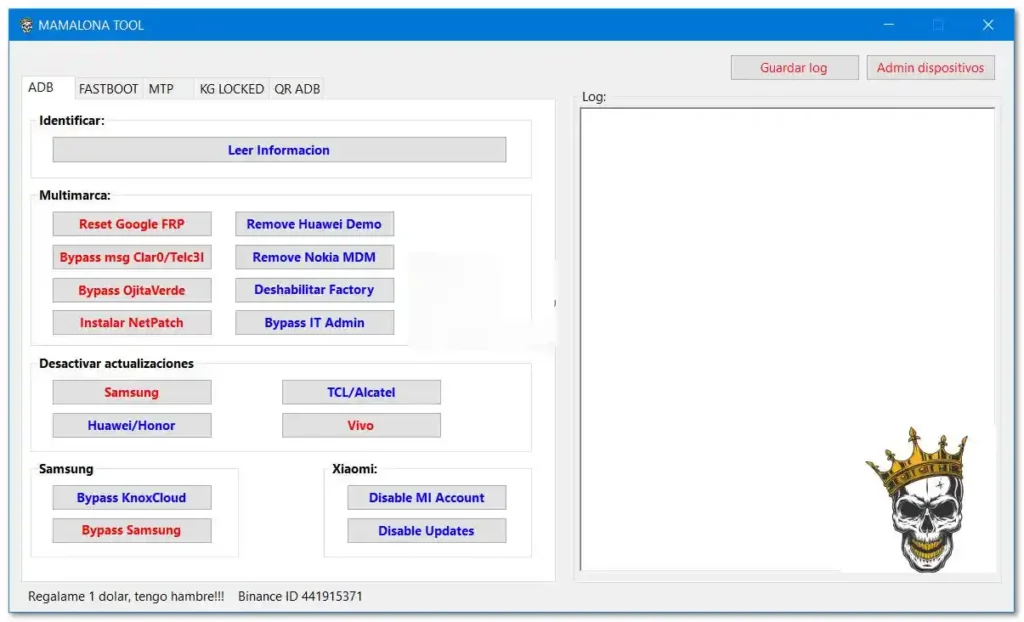
Key Features of MAMALONA Tool 2026
 ADB Functions
- Read Device Info — read detailed information from a connected device
- Reset Google FRP — remove Google Factory Reset Protection lock
- Bypass msg Claro/Telc31 — bypass specific carrier message restrictions
- Bypass OjitaVerde — alternative bypass method for supported devices
- Install NetPatch — install the NetPatch tool on the device
- Remove Huawei Demo — remove demo mode from Huawei devices
- Remove Nokia MDM — remove MDM restrictions on Nokia devices
- Disable Factory — disable factory reset protection
- Bypass IT Admin — bypass IT administrator lock restrictions
MAMALONA Tool 2026 Download
- File Name: Mamalona_Tool_V2_pASS__MamaTool_.rar
- Version: (Latest)
- File Size: 30 MB
- Platform: Windows PC
- Type: Portable — no installation required
- Archive Password: MamaTool
 Download (Mediafire)
How to Install MAMALONA Tool 2026
Since the tool is portable, there is no traditional installer involved. Follow these steps:- Download the ZIP file using the download button above.
- Extract the downloaded archive using 7-Zip or WinRAR.
- When prompted for a password, enter: MamaTool
- Open the extracted folder and locate Mamalona Tool.exe.
- Double-click the EXE file to launch the tool directly — no setup wizard needed.
- The tool opens immediately and all functions are available from the main interface.
Tip: Right-click the EXE and select Run as Administrator to avoid any permission-related issues during ADB or Fastboot operations.