


- Mar 24, 2025
- 56
- 4
- 18
Pixel 6 Series Tool By Aamir Buneri Free For All Users
The Pixel 6 Series Tool by Aamir Buneri is a helpful and free software made especially for people who use or fix Google Pixel 6 phones. It gives powerful features to unlock, repair, and manage Pixel 6 devices. The best part? It’s completely free for everyone.
The Pixel 6 Series Tool by Aamir Buneri is a helpful and free software made especially for people who use or fix Google Pixel 6 phones. It gives powerful features to unlock, repair, and manage Pixel 6 devices. The best part? It’s completely free for everyone.
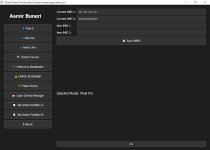
 Supported Devices:
The Pixel 6 Series Tool supports the following models:
- Google Pixel 6
- Google Pixel 6 Pro
It may also work with other Pixel models with similar architecture, but it is mainly made for the Pixel 6 series.
Main Features of Pixel 6 Series Tool:
Here are the major features that come with this amazing tool:
 1. FRP (Factory Reset Protection) Bypass
Factory Reset Protection is a security feature by Google. It locks your device after a factory reset if you don’t know the original Google account. The tool can remove FRP from your Pixel 6 with just one click using Fastboot or ADB mode.
2. Bootloader Unlock
Want to flash a custom ROM or root your device? You’ll need to unlock the bootloader first. This tool provides a safe and easy way to unlock or re-lock the bootloader.
3. ADB Mode Functions
If your Pixel 6 is connected in ADB (Android Debug Bridge) mode, this tool can:
- Read device information
- Reboot into Fastboot or Recovery mode
- Remove FRP (if USB debugging is on)
- Factory reset
4. Fastboot Mode Options
Fastboot mode is used to flash files and commands to the device. In this mode, the tool can:
- Flash firmware files
- Remove FRP
- Unlock bootloader
- Reboot device
5. OTA Update Block
Pixel phones automatically install updates that may bring back FRP or other locks. The tool can block OTA (Over The Air) updates to keep the device safe from auto-locks.
6. Read and Write Device Info
You can read the full device details like model, build number, software version, etc. This helps in checking the status before and after repair.


 Full Setup Download Link ◀